Chrome side panel for Back Market and Refurbed

Turn every marketplace ticket into a clear reply and next action.

Loopmerce reads the open ticket, order details, warranty context and customer conversation directly beside your seller dashboard. In seconds, your agent gets the real problem, a ready-to-review reply and the next step to take.
  • No separate AI key
  • Human review stays in control
  • Works beside the open ticket
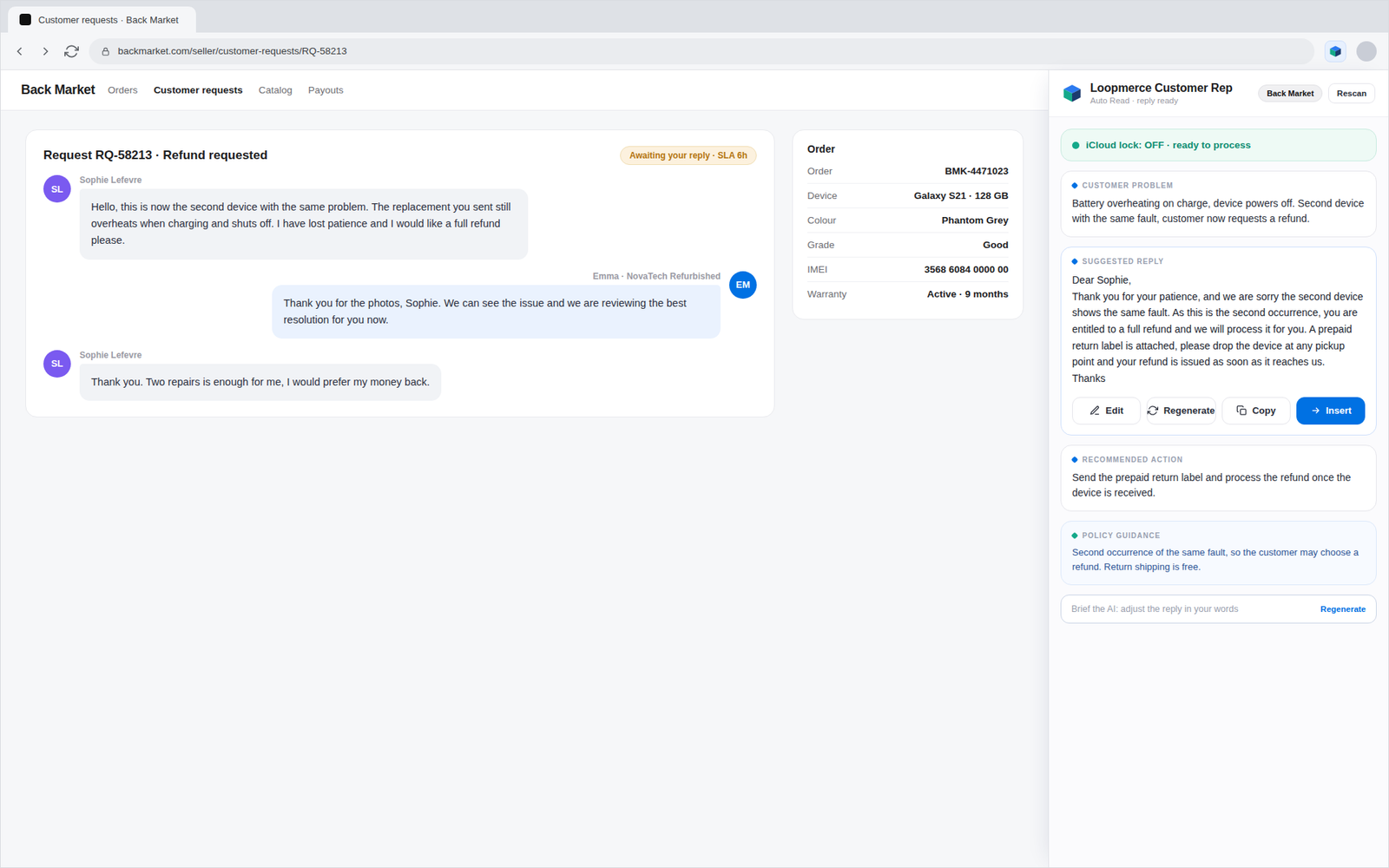
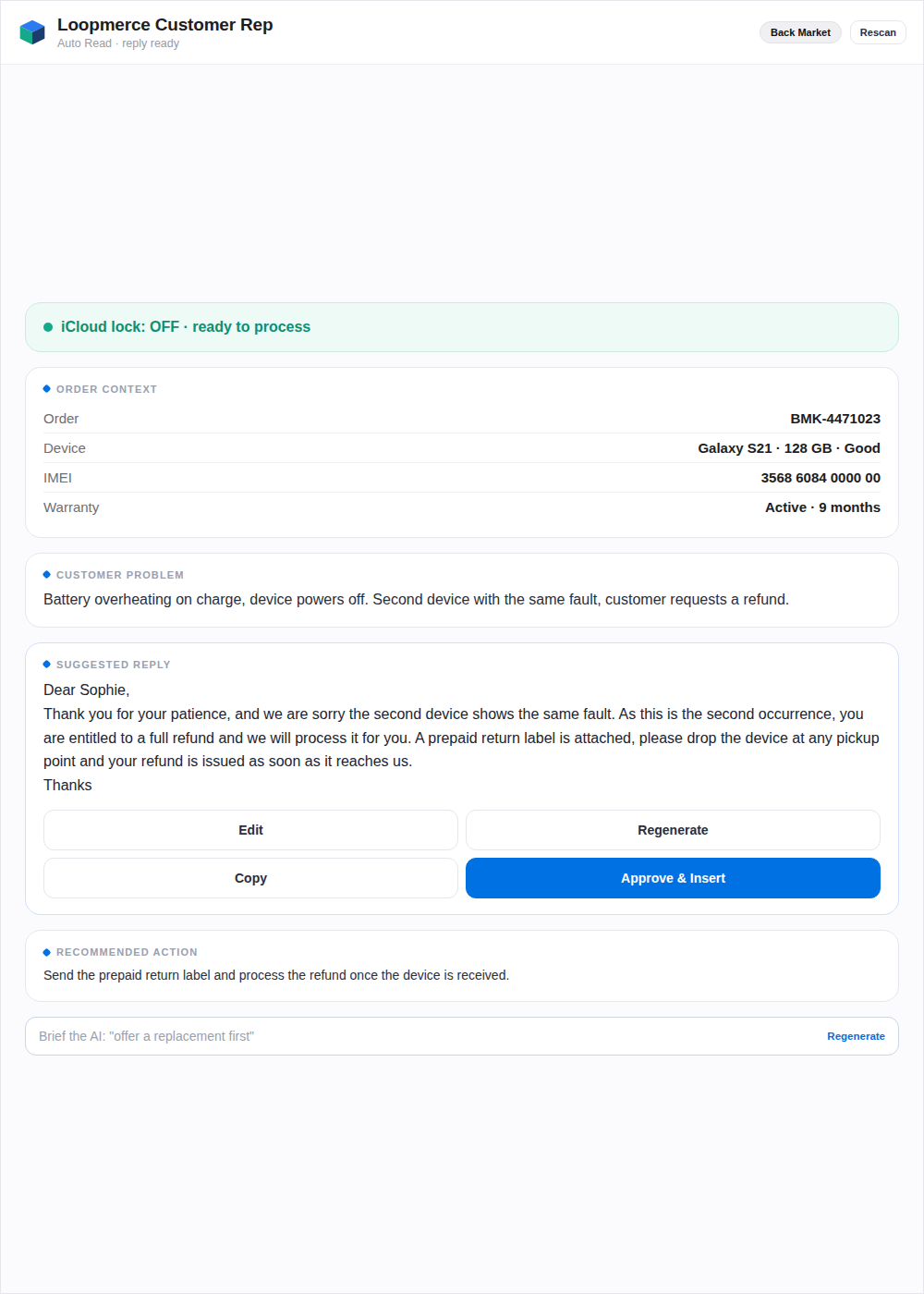
A Back Market seller ticket open in Chrome with the Loopmerce Customer Rep panel docked on the right, showing the customer problem, a suggested reply with edit, regenerate, copy and insert controls, the recommended action and policy guidance
Close-up of the Loopmerce side panel with order context, customer problem and a suggested reply ready for review
Ticket read Problem identified Reply prepared Next action ready

€149/month. Up to 2 PCs included. Account approval required.

Built around your existing workflow

Stay inside the marketplace ticket.

Customer Rep works beside supported Back Market and Refurbed seller dashboards, including European marketplace workflows and the newer Refurbed support environment.


Back Market Refurbed Google Chrome side panel European language support

Loopmerce is an independent product and is not owned or endorsed by Back Market or Refurbed.

The real support bottleneck

The reply is not the hard part. Finding the right answer is.

Before an agent can respond, they may need to read the full conversation, find the order, check the warranty, inspect tracking, confirm the relevant marketplace workflow, understand the customer's language and decide what should happen next.

Before Loopmerce Customer Rep

One reply, eight scattered tools.

To answer a single ticket the agent jumps between the marketplace inbox, the order and warranty records, a tracking portal, policy documents, a translator, a template file and a spreadsheet, then retypes it all by hand.

Marketplace inboxTickets in many languages Order detailsDevice, grade, IMEI Warranty recordCoverage and dates Tracking portalWhere is the parcel
Policy documentsReturns and warranty TranslatorCopy, paste, hope Template fileFind the right one SpreadsheetLog it by hand
The result is slow replies, inconsistent tone and missed marketplace deadlines.

SLA pressure

Slow replies can expose the seller to avoidable escalations and marketplace consequences.

Inconsistent answers

Different agents may interpret the same situation differently, creating uneven tone and outcomes.

Policy complexity

Warranty periods, return windows, battery rules, third-party repairs and device-lock cases are easy to mishandle.

Multilingual queues

German, French, Dutch, Italian, Spanish and other European conversations arrive inside the same support workload.

Repeated typing

Agents rewrite the same delivery, refund, return and warranty answers throughout the day.

Missing history

A repeat return may look like a first-time case when the previous issue is buried in another system.

Customer Rep turns that scattered investigation into one reviewable workflow beside the ticket.

One panel. The full context.

Keep the ticket open while Loopmerce does the detective work.

Customer Rep detects the supported marketplace, reads the available conversation and order context, and prepares the information the agent needs without copying the ticket into another AI tool.

  • No separate support portal
  • No copying the conversation into another AI tool
  • No separate AI account or key
  • No opening a translator for every reply
  • No losing sight of the original customer message

The agent stays in the marketplace. The answer appears beside it.
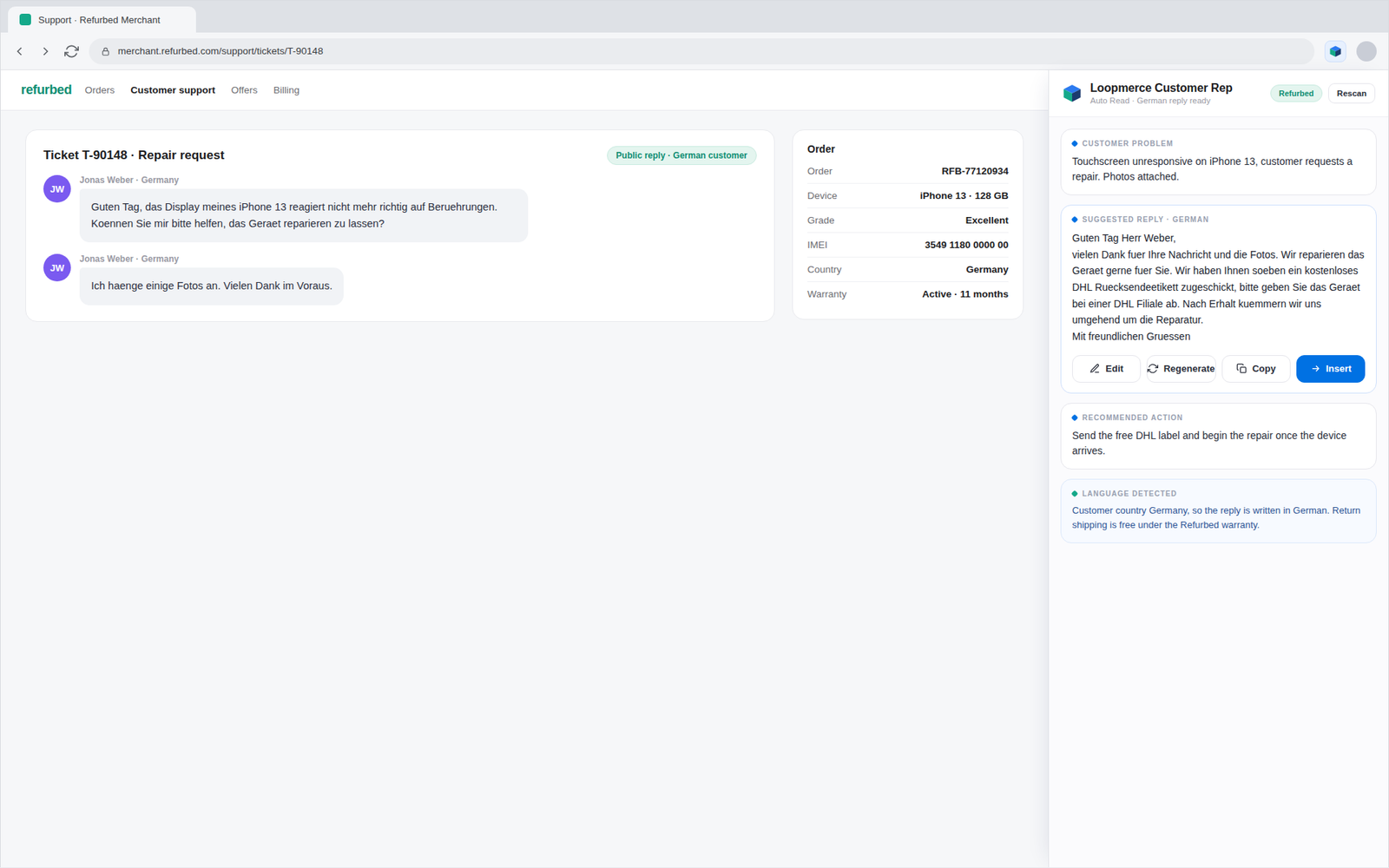
A Refurbed seller support ticket in Chrome with the Loopmerce side panel docked on the right, linking the customer conversation to the generated reply and next action
Auto Read

One click. Three useful outputs. No guesswork.

Auto Read turns the complete case into three pieces of information the agent can act on immediately.

1

Customer problem

A clean summary of the actual fault or request for the support or repair team.

2

Suggested reply

A complete customer-facing response prepared from the available ticket, order and workflow context.

3

Recommended action

The next operational step, such as requesting photos, preparing a label, repairing, exchanging, refunding or escalating.

MarketplaceOrderProductWarranty statusIMEI or serialTrackingConversation history

The whole conversation is considered before the draft is prepared.
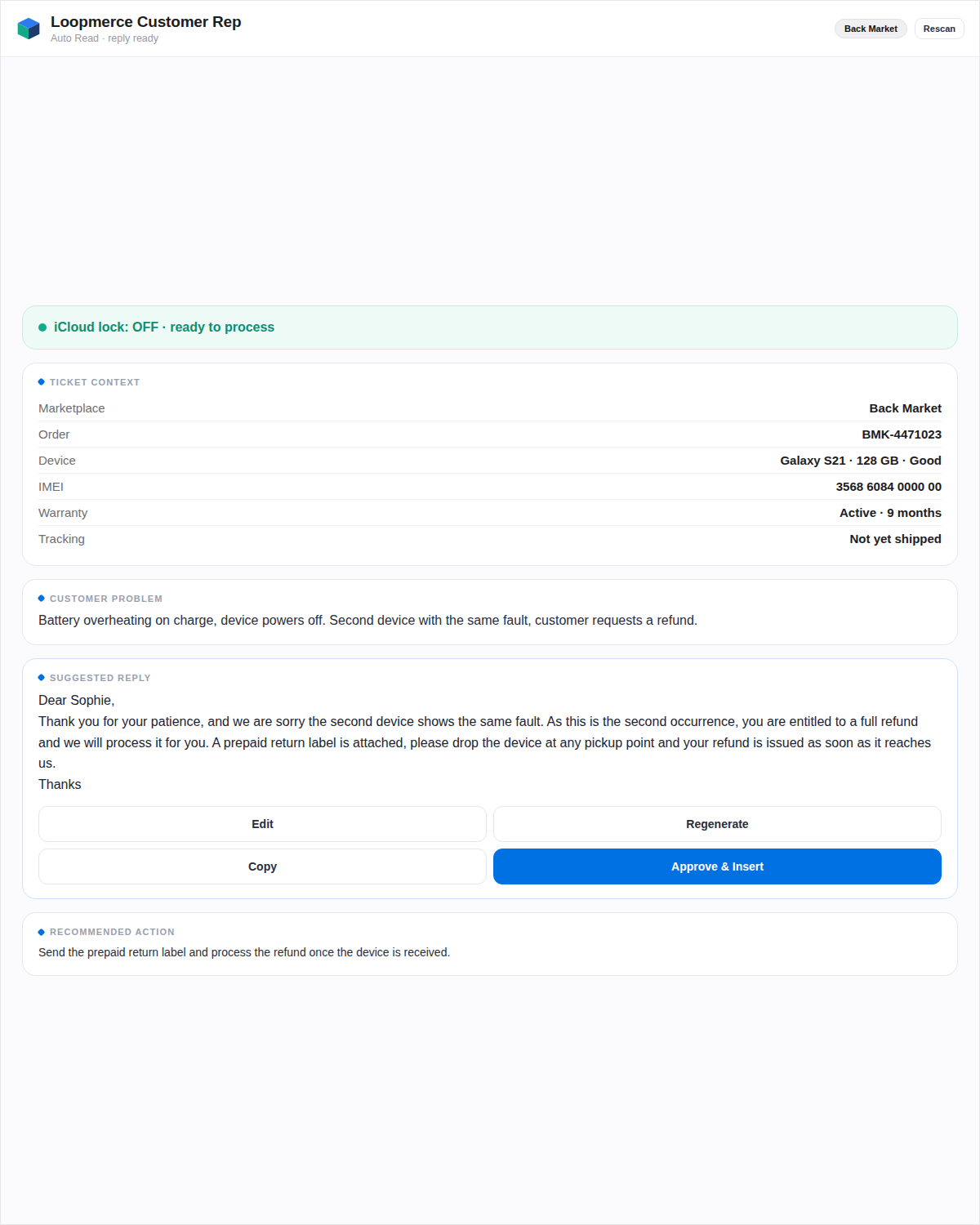
The side panel showing ticket context, the customer problem, a suggested reply with review controls and the recommended action
80+ proven replies

Stop rewriting the answers your team already knows.

Search by keyword, browse a category or describe the situation in your own words. Customer Rep finds the relevant response, fills the available ticket details and prepares it for review.
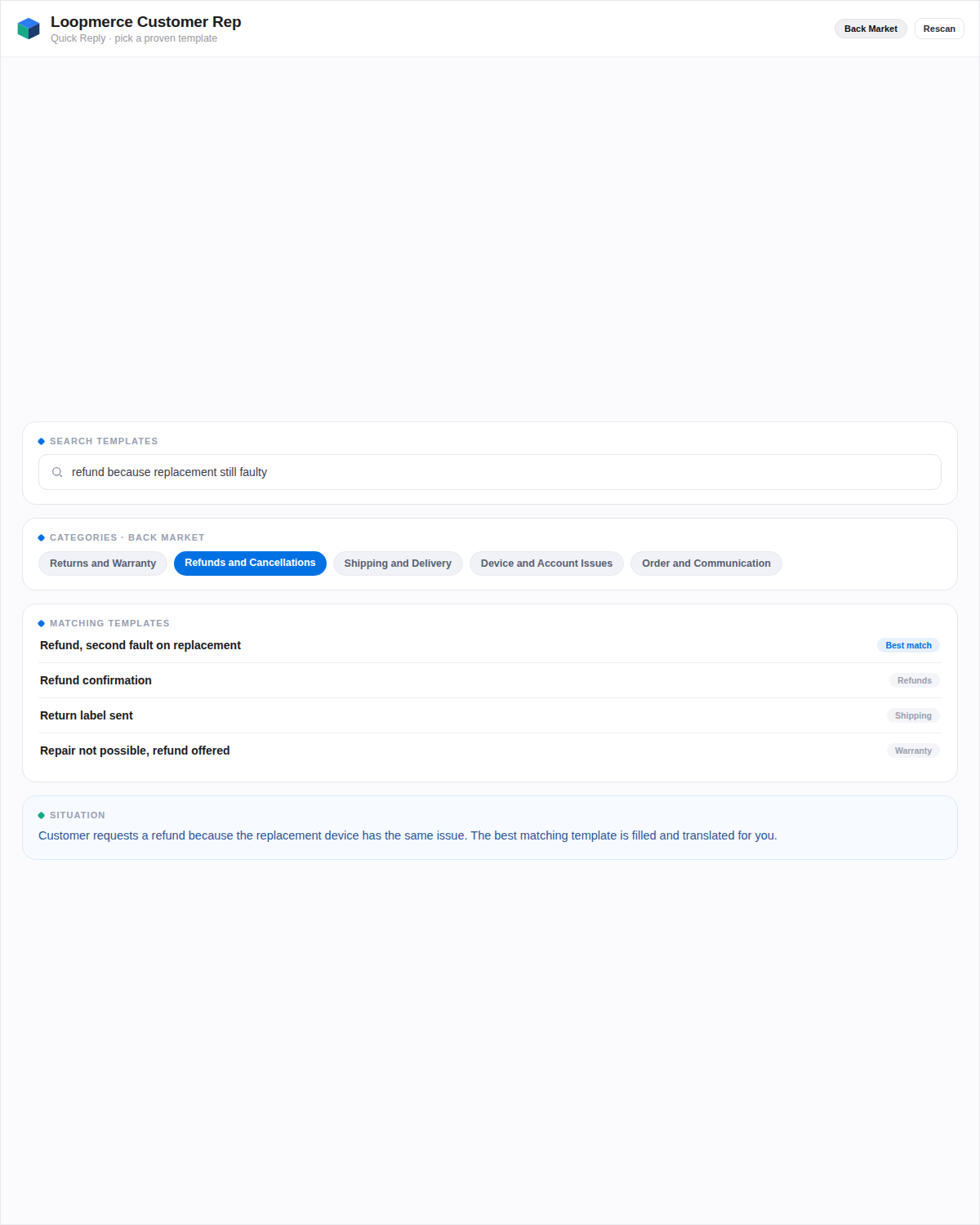
Returns and WarrantyRefunds and CancellationsShipping and DeliveryDevice and Account IssuesOrder and Communication
  • Marketplace filtered. Back Market agents see Back Market and shared templates. Refurbed agents see Refurbed and shared templates.
  • Ticket details inserted. Available customer, order and case details are filled into the response.
  • Customer language respected. Where supported, the selected response can be prepared in the customer's language.
  • Consistent starting point. Agents start from a proven response structure rather than an empty text box.
The Quick Reply library grouped into categories with a search field and template previews
Agent control

Change the instruction without rewriting the reply.

When the first draft does not fit the case, the agent can add one direct instruction and regenerate it.

Example instruction. Out of warranty. Water damage is visible. Do not offer a refund. Ask the customer to send repair photos.

The agent's instruction guides the new draft, while the final response remains available for human review.
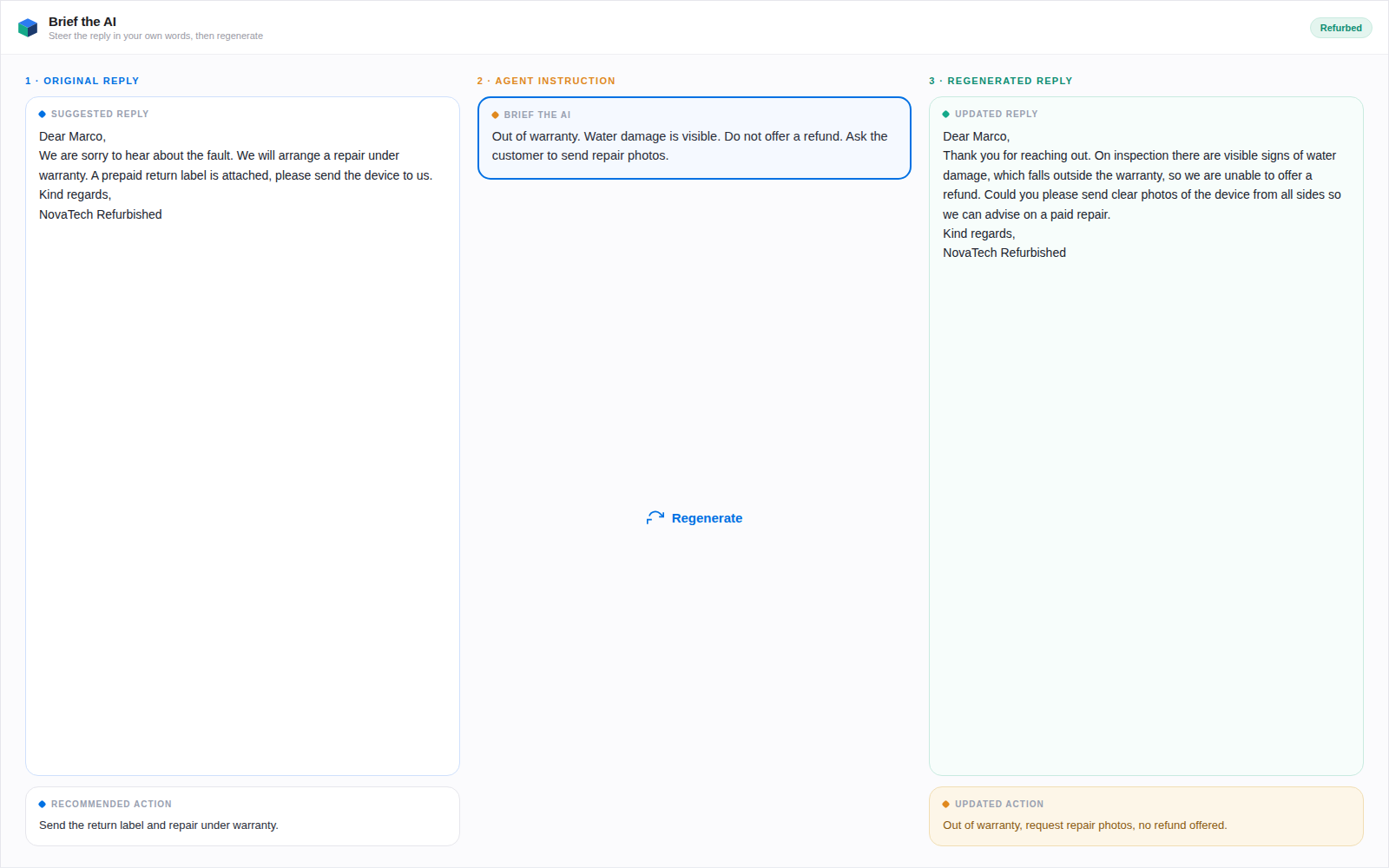
The original suggested reply, the agent instruction typed into Brief the AI, and the regenerated reply with an updated recommended action
Custom Message

Write it roughly. Send it professionally.

Type the facts the way you would explain them internally. Customer Rep rewrites the message into a clear customer response without changing the meaning.
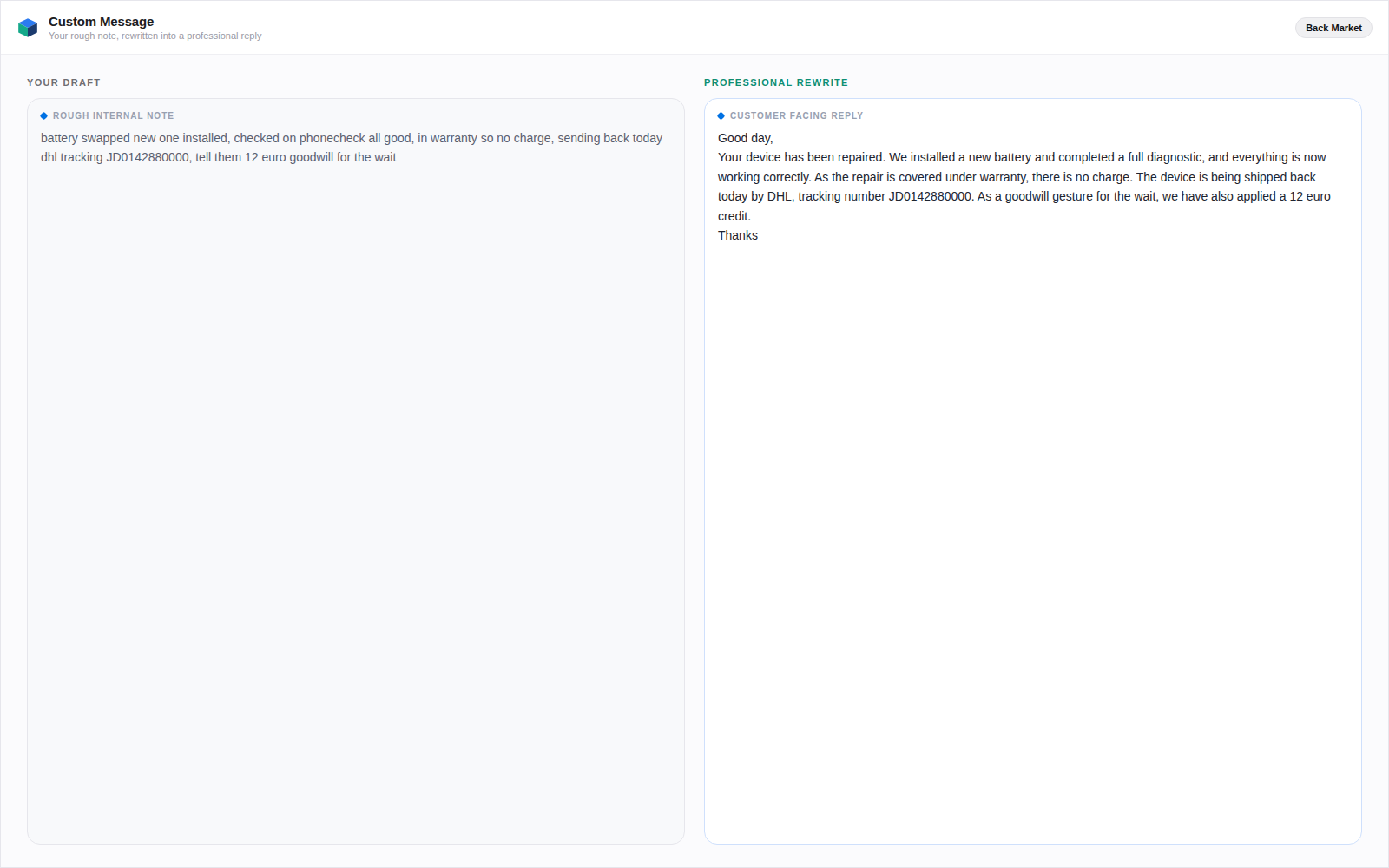
  • Preserves the original meaning
  • Keeps amounts and tracking details
  • Improves grammar and tone
  • Adds no unsupported facts
  • Remains editable by the agent
A rough internal note on the left rewritten into a clear, professional customer response on the right
European support

Reply in the customer's language without opening a translator.

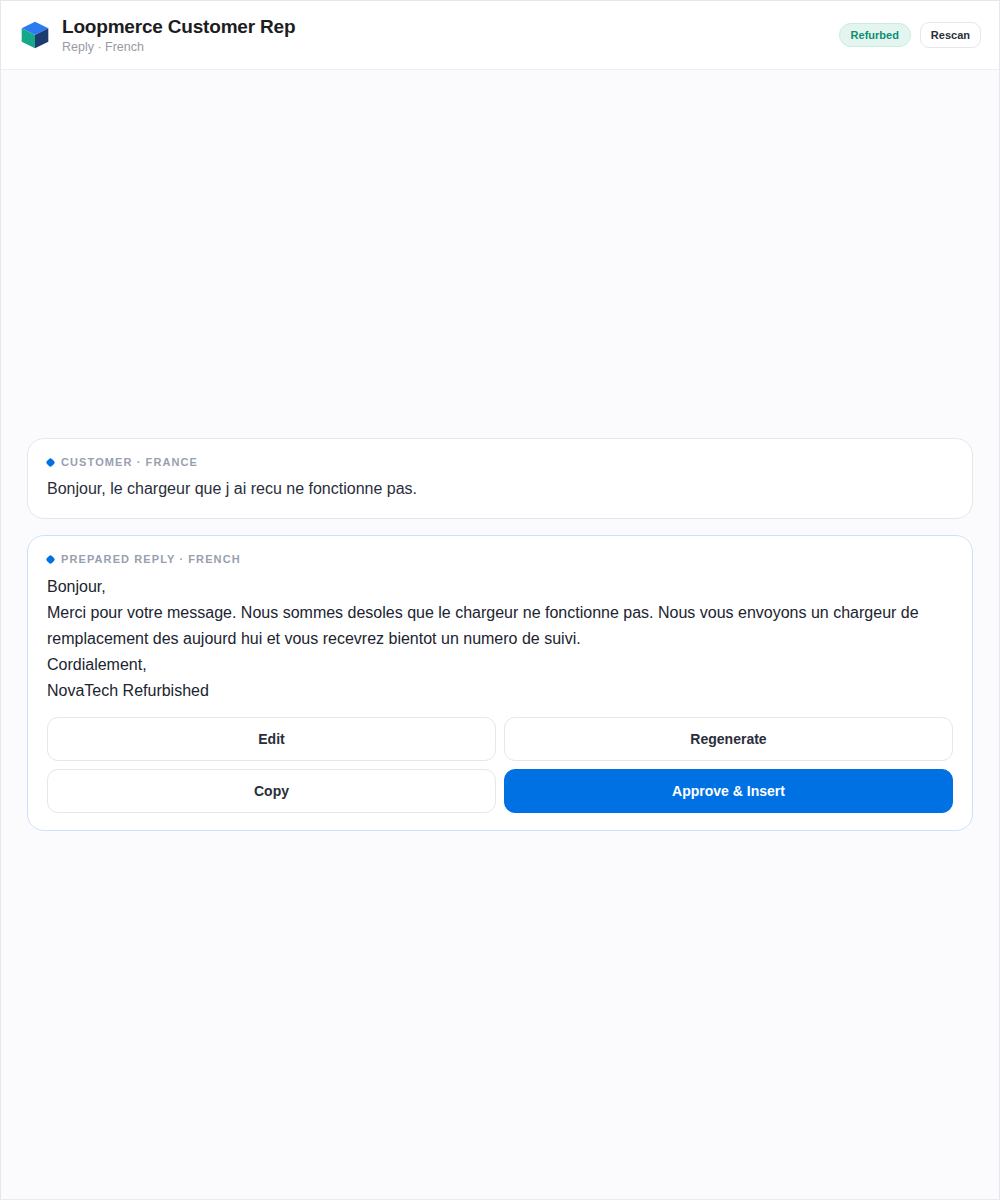
Customer Rep uses the available order and conversation context to prepare responses across supported European languages.

GermanFrenchDutchItalianSpanishPortuguesePolishand more
Back Market replies are prepared in English according to the configured workflow.
Refurbed replies can be prepared in the customer's language where supported.

One support team can serve several European markets without maintaining a separate manual template library for every language.
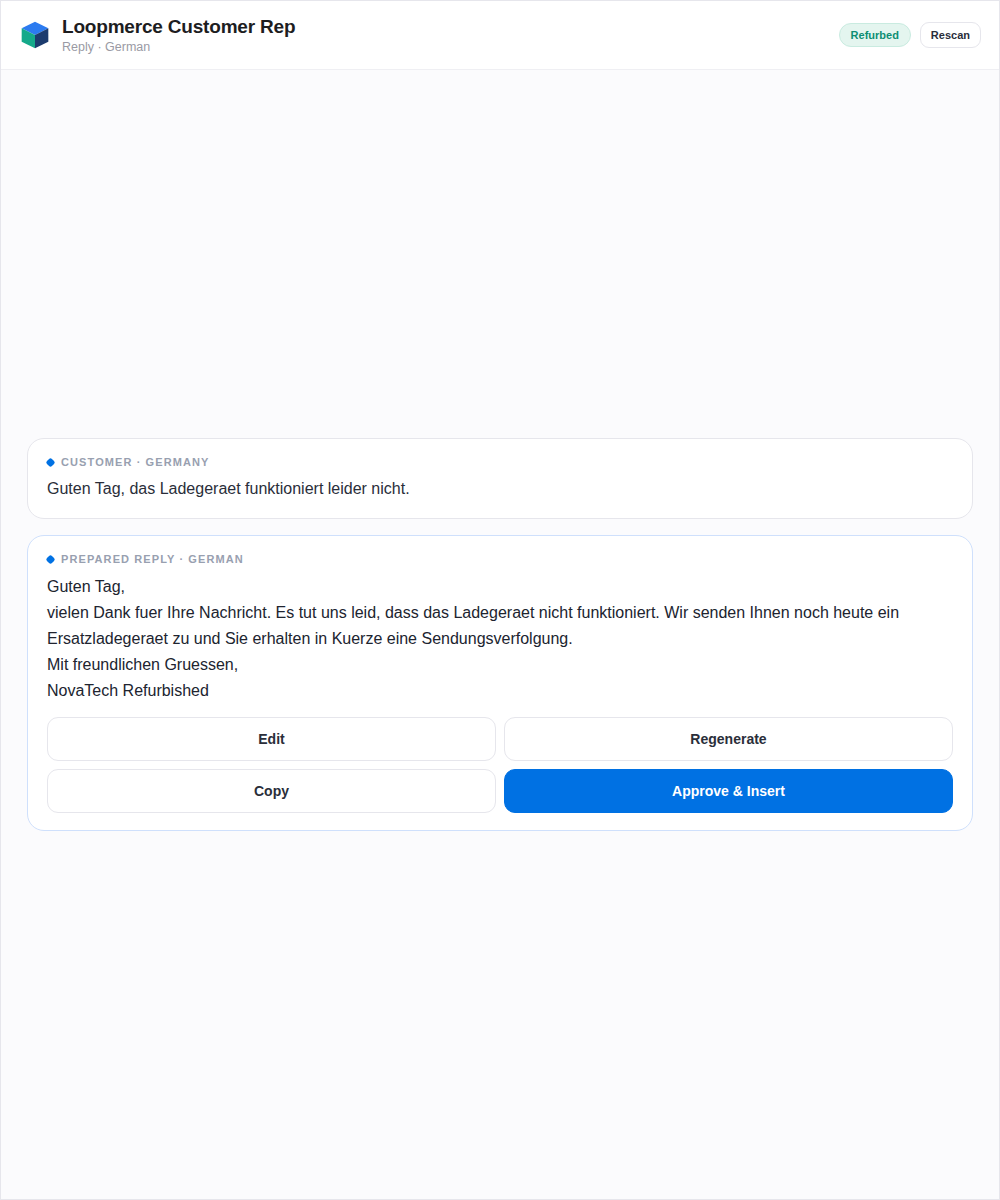
A suggested reply prepared in German
A suggested reply prepared in French
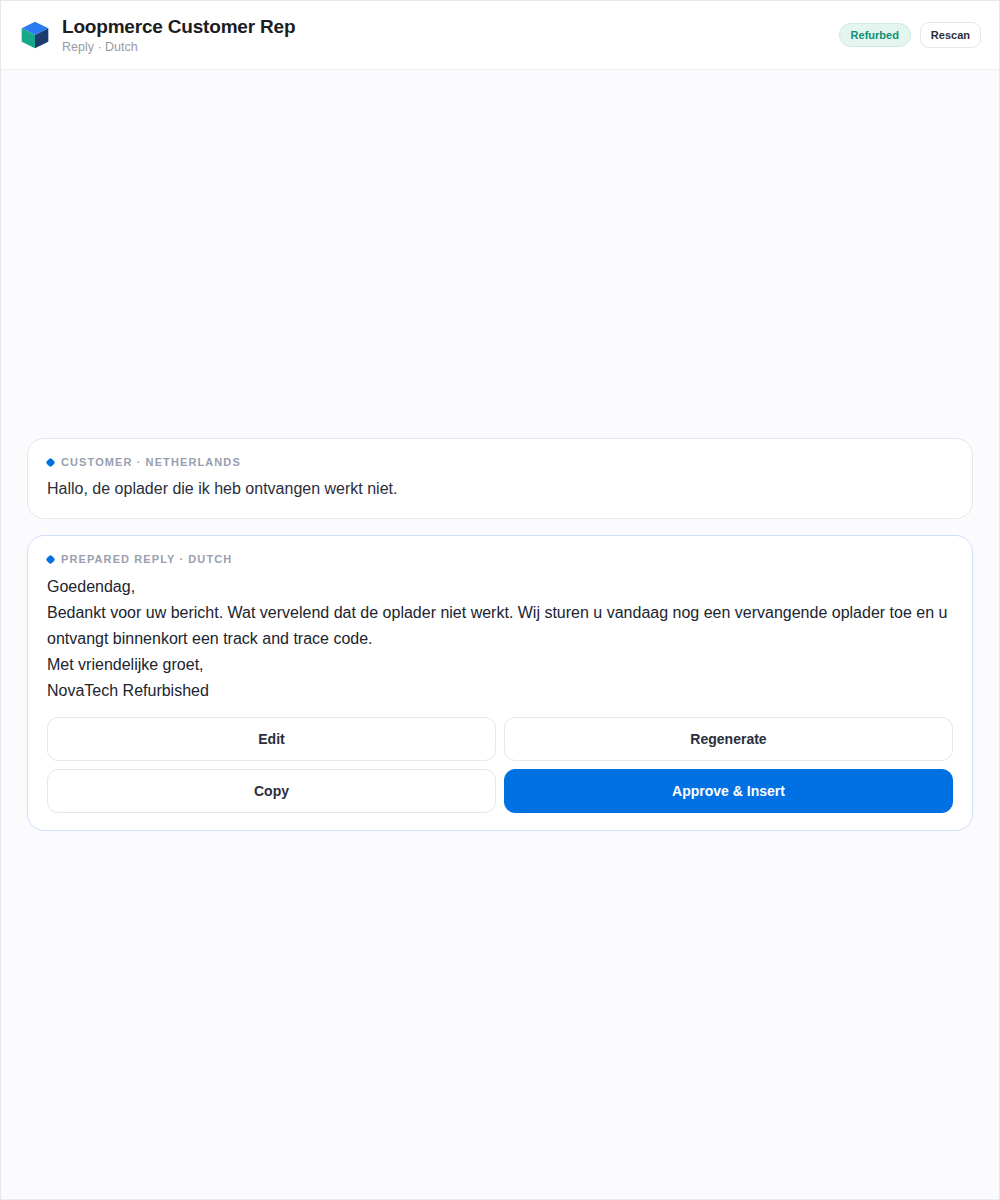
A suggested reply prepared in Dutch
Device-lock context

Check the lock before promising the wrong resolution.

For supported Apple-device cases, the agent can run an optional iCloud or Find My lock-status check directly from the side panel.
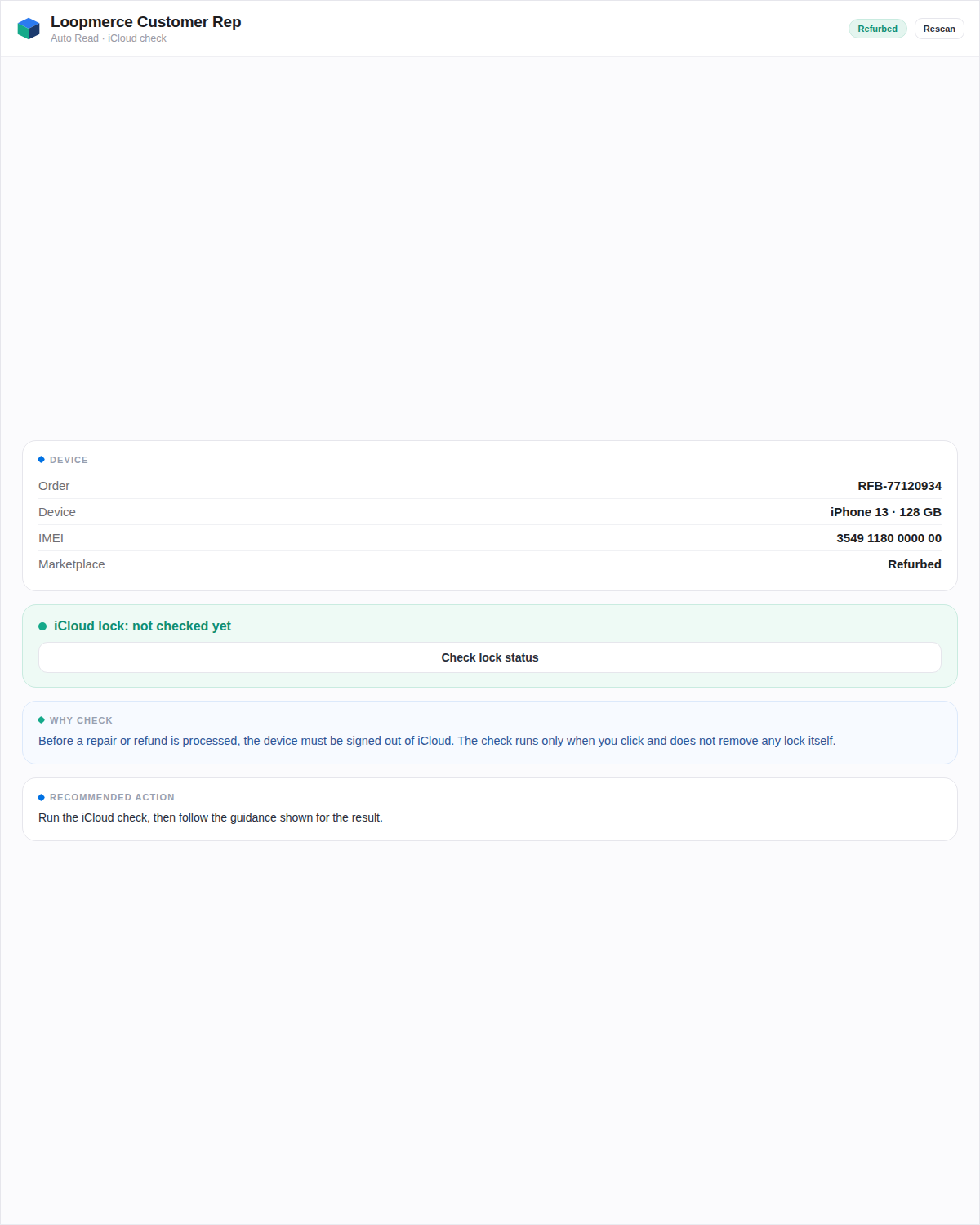
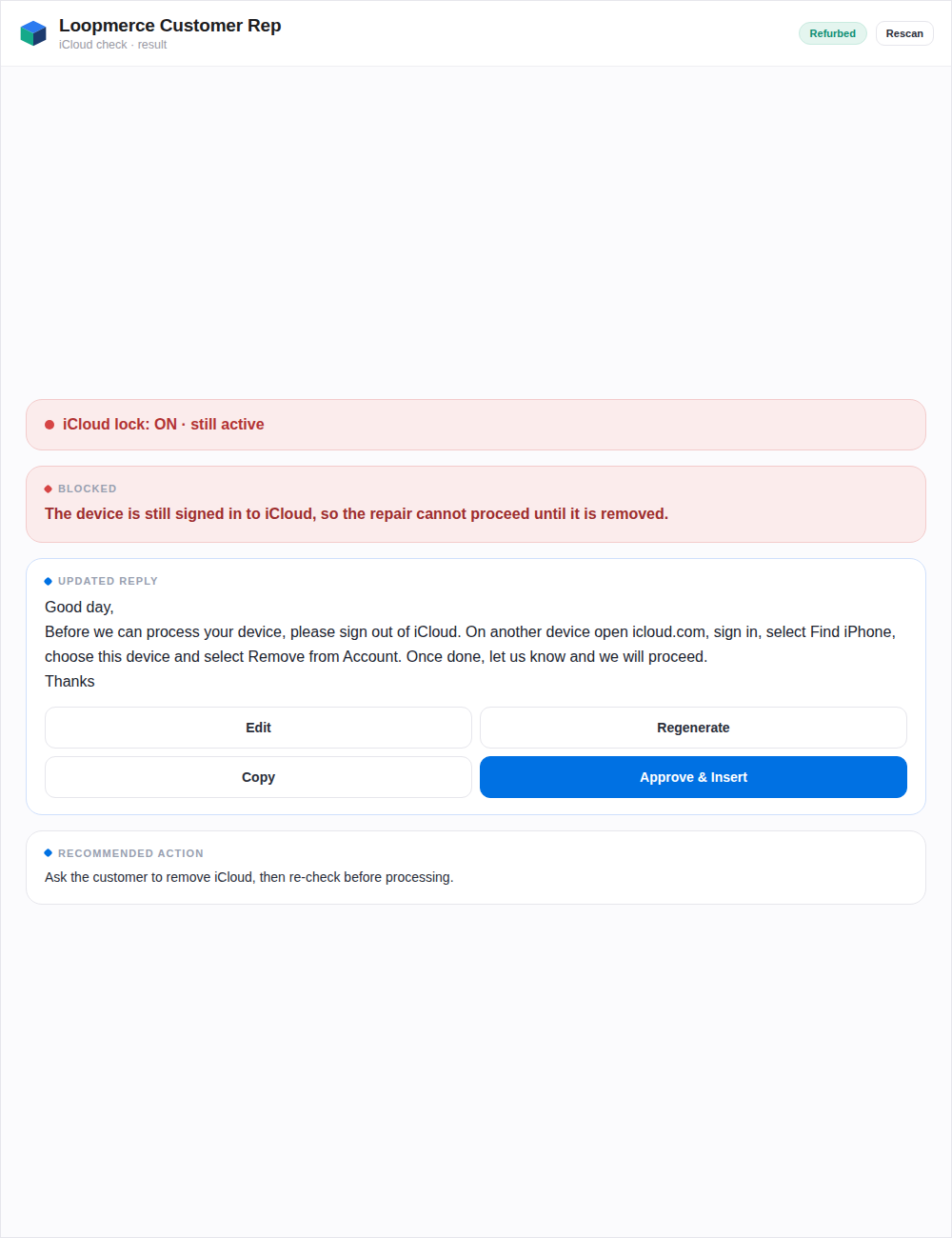
  1. Device identifier available
  2. Agent clicks Check lock status
  3. Checking state
  4. Locked or unlocked result
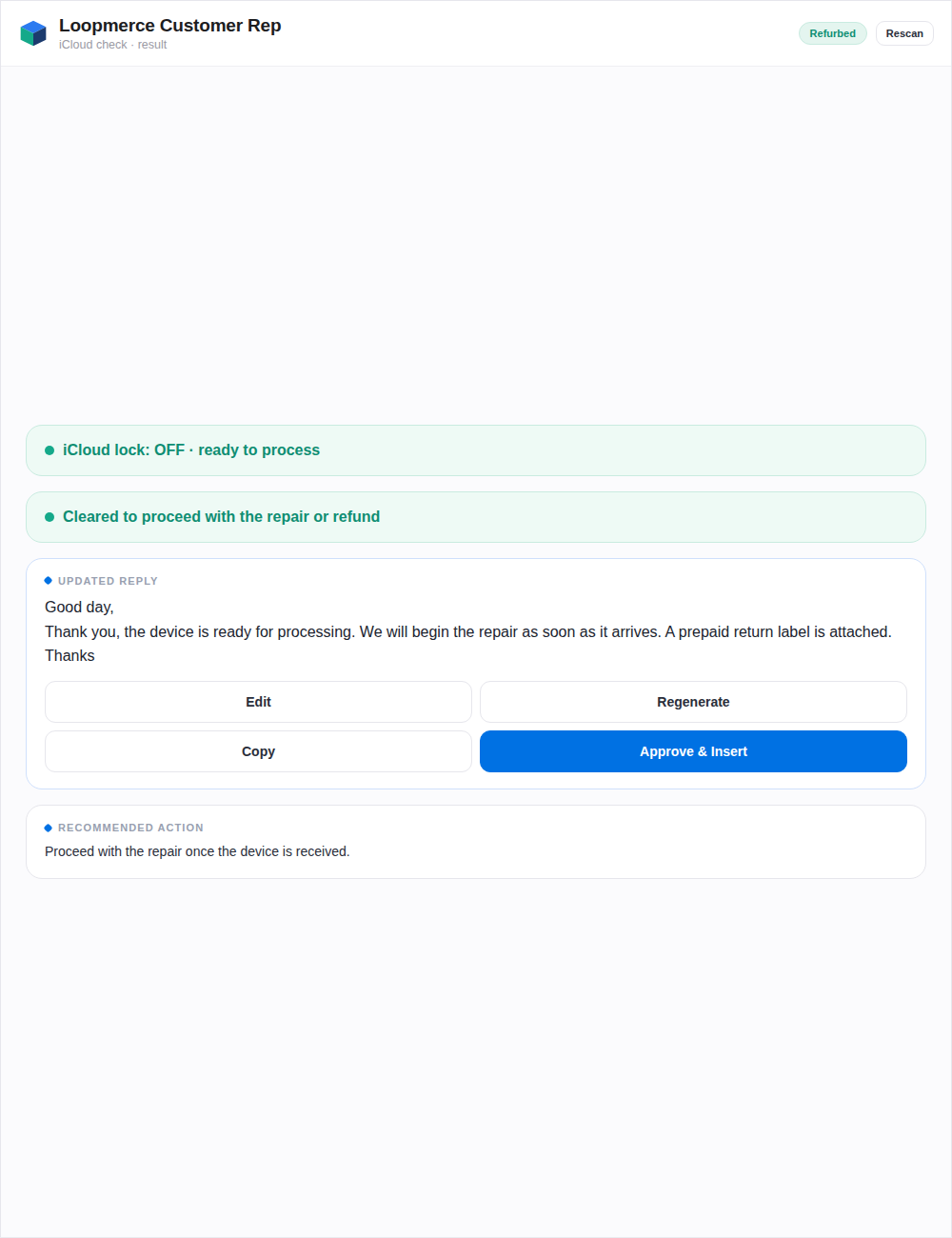
  5. Updated reply guidance
  6. Updated recommended action
  • Runs only when the agent chooses
  • Keeps the result beside the ticket
  • Helps clarify repair, return and refund handling
  • Reduces confusion around locked devices
Customer Rep checks available lock-status information. It does not remove activation locks.
The side panel with a Check lock status control for a supported Apple device
A locked result with updated reply guidance for a device that is still activation locked
An unlocked result with updated reply guidance for a device that is ready to process
Marketplace guidance

Give the agent the rule and the next step, not another policy document.

Customer Rep uses configured Back Market and Refurbed workflow guidance to help prepare a more consistent response. This is policy-grounded guidance that stays beside the reply.
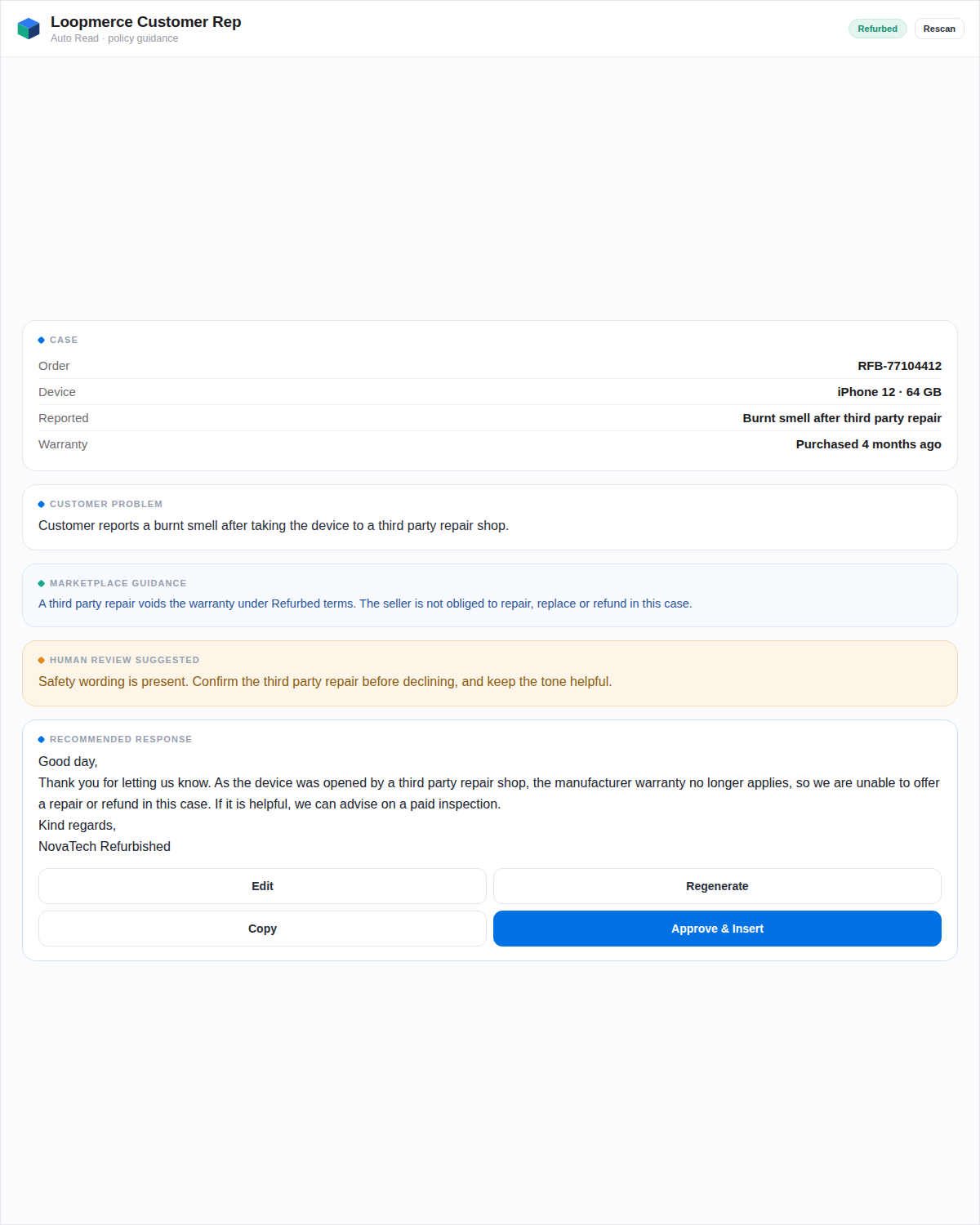
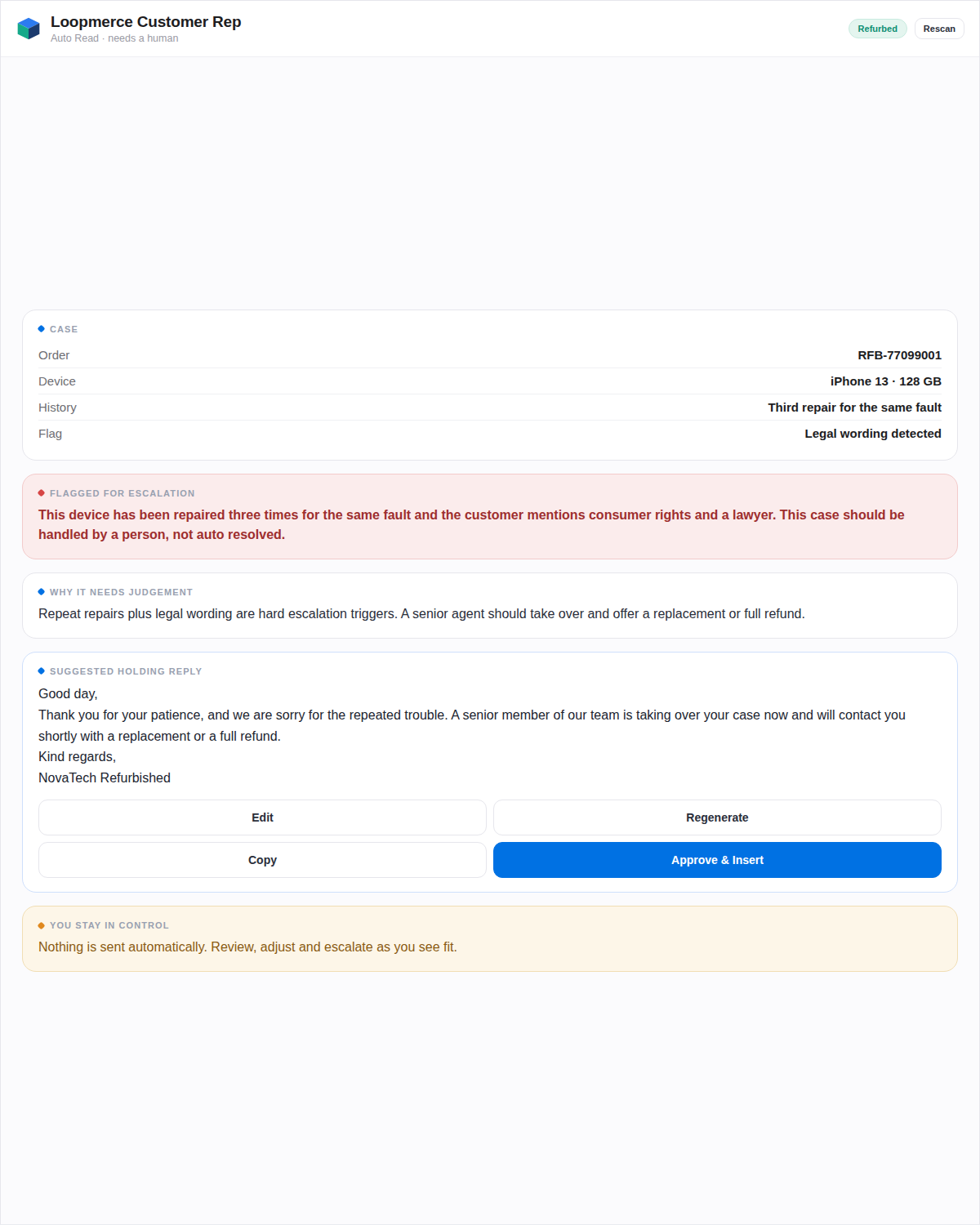
  • Ask for photos before preparing a return label
  • Request a proper issue description when details are missing
  • Distinguish between repair, exchange and refund paths
  • Identify third-party repair concerns
  • Account for warranty and return windows
  • Recognise device-lock cases
  • Recognise lost-parcel and delivery cases
  • Flag cases that require human judgement
Policy guidance shown beside the reply, giving the applicable rule and the next step for the case

A strong reply should

  1. Acknowledge the customer's concern
  2. Use a respectful and professional tone
  3. Give a complete next step
  4. Explain what the customer needs to do
  5. Arrive while the case is still actionable
A complex case flagged for human review, ready for an agent to escalate
Optional record keeping

Handle the ticket once. Keep the record automatically.

When Google Sheets logging is connected, Customer Rep records the handled case inside the organisation's own spreadsheet.
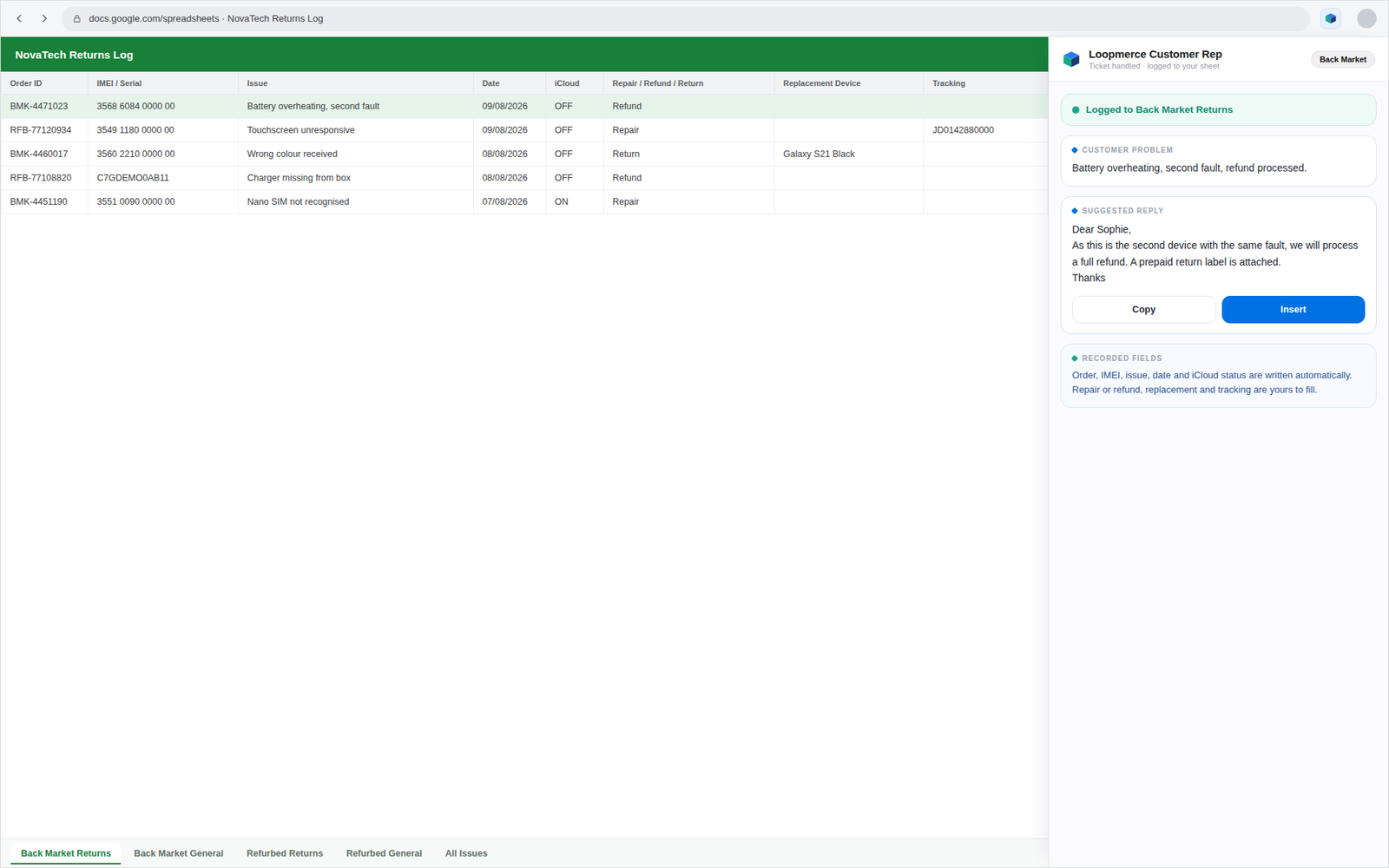
A connected Google Sheet with separate marketplace and case tabs and a handled ticket logged as a new row

Automatically filled

  • Order ID
  • IMEI or serial
  • Issue
  • Date
  • iCloud status

Agent-managed

  • Repair
  • Refund
  • Return
  • Replacement device
  • Tracking
  • Separate marketplace and case tabs
  • One master issue list
  • Searchable operational history
  • No duplicate manual entry after every reply
  • Logging remains optional
Case history

Know when "another return" is the same device again.

Customer Rep checks the connected operational record and warns the agent when the same order has already returned.
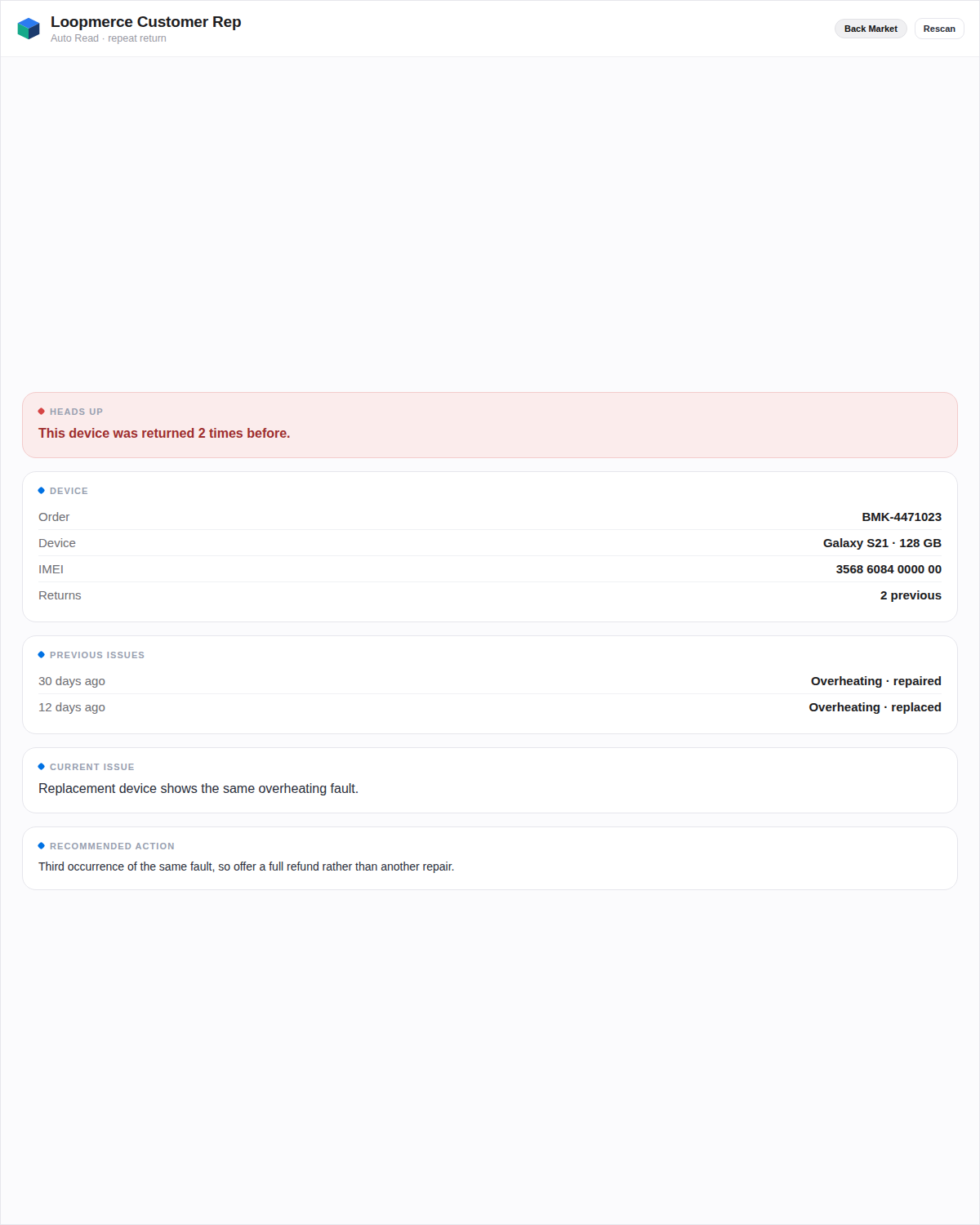
This device was returned 2 times before.
  • Previous return count visible beside the ticket
  • Better context before selecting the next action
  • Recurring faults are easier to recognise
  • Handoffs do not depend on someone remembering the case
A repeat-return warning shown beside the ticket noting the device was returned twice before
Your workspace

Keep your replies consistent and your daily activity visible.

Agent-facing settings that live in the panel, so every reply closes the same way and each agent can see their own day.

Your sign-off, your voice

The agent or organisation can save the company name and approved reply sign-off so customer messages close consistently.

Marketplace and language preferences

Set the default marketplace, default reply language and automatic matching where supported.

Personal activity

See your own replies prepared this month, tickets handled, iCloud checks performed and current plan access status.
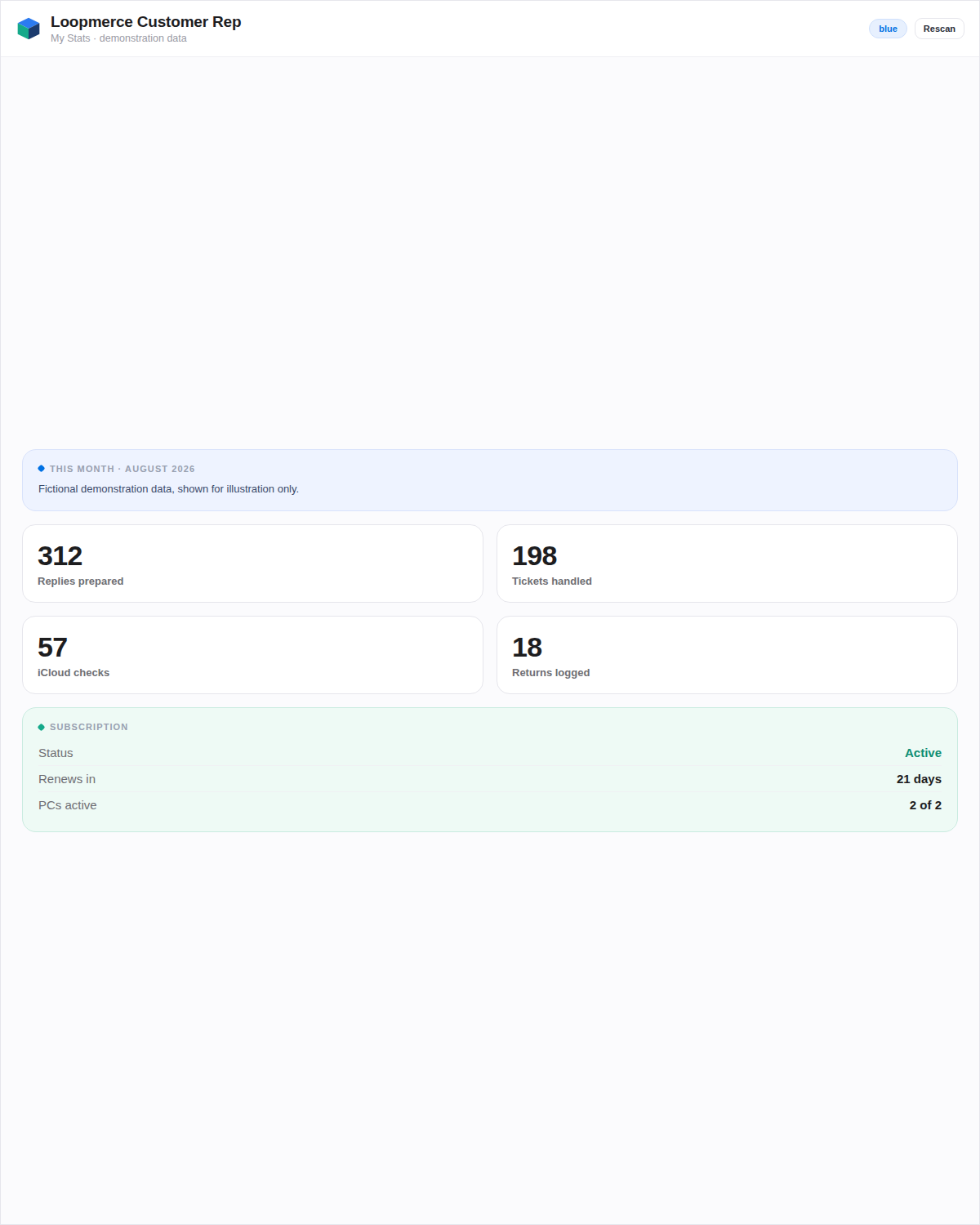
An agent's personal activity view with replies prepared, tickets handled, lock checks and plan access, shown with demonstration values

Personal activity shown with demonstration values.

From install to first reply

Start without rebuilding your support operation.

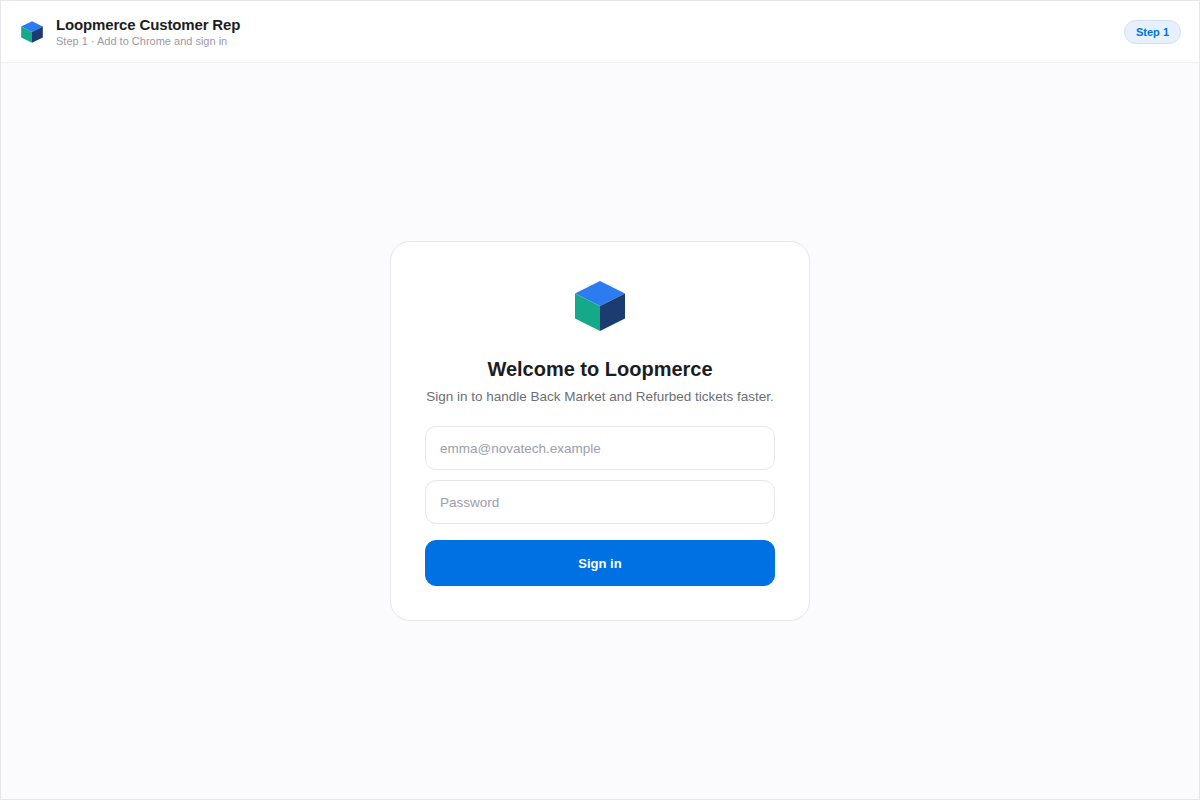
The Loopmerce Customer Rep extension in Google Chrome, ready to sign in
1

Download the extension

Download Loopmerce Customer Rep for Google Chrome.
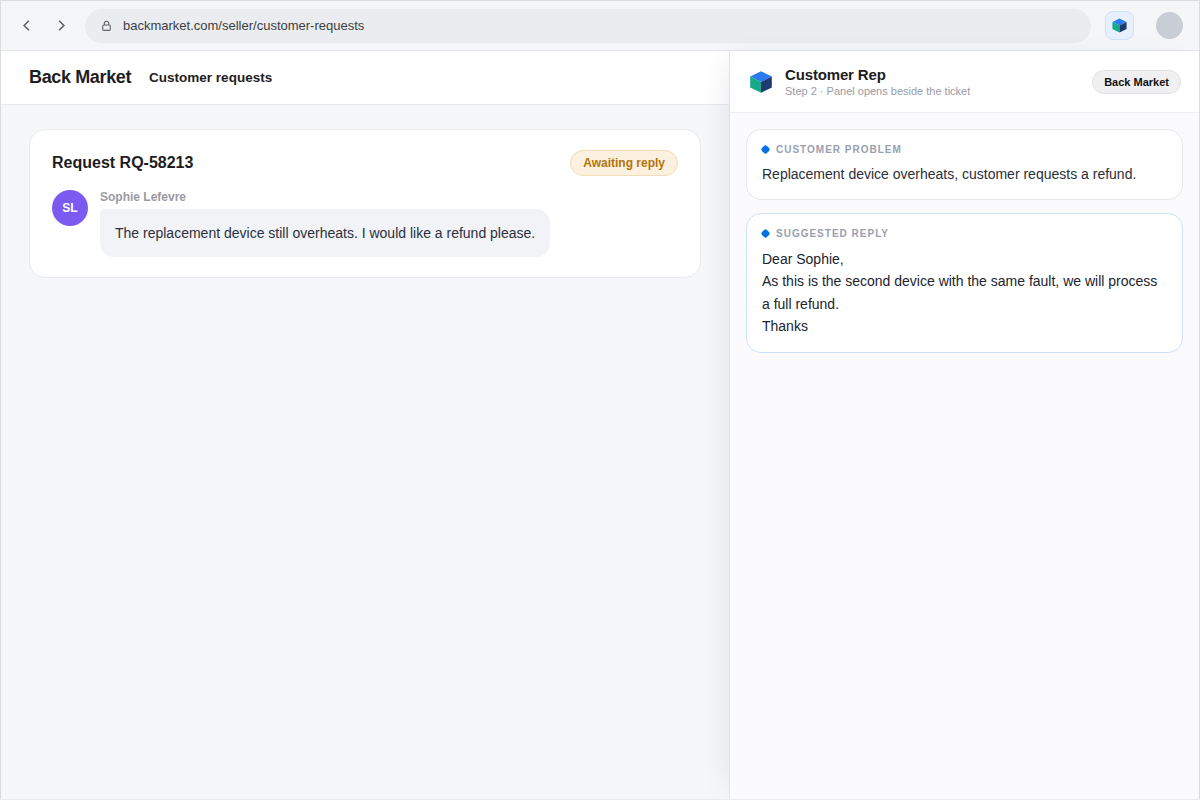
Signing in with an approved Loopmerce account beside a supported marketplace ticket
2

Sign in after approval

Use the Loopmerce account that has been approved and activated for your organisation.
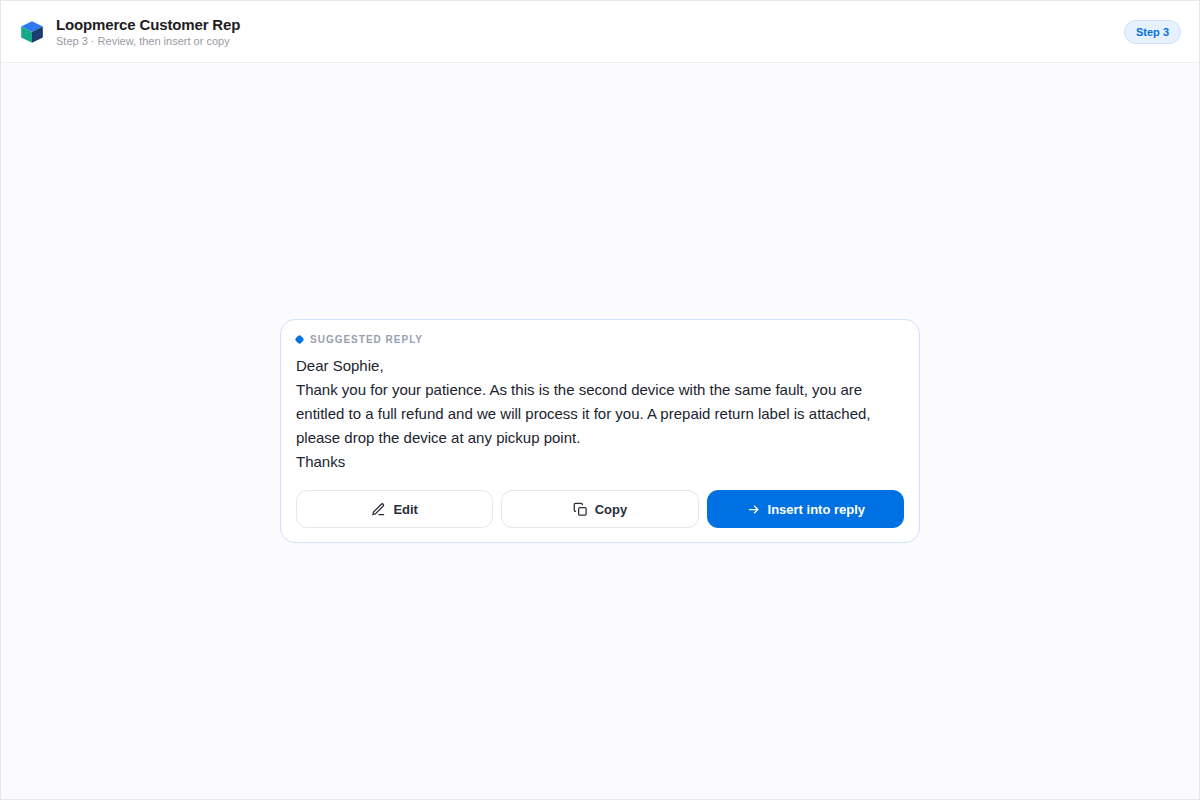
Reviewing the customer problem, suggested reply and recommended action, then inserting the response
3

Open a ticket and continue

Open a supported Back Market or Refurbed ticket, generate the customer problem, reply and recommended action, then review and insert the response.

No separate AI key. No new support inbox. Approved Loopmerce account required.

Download Chrome Extension

€149/month. Activation requires an approved Loopmerce account.

What changes for the agent

Less searching. Less rewriting. More consistent support.

Start with context

The ticket, order and available case information stay together.

Respond from a proven structure

Agents no longer begin every familiar situation from an empty message box.

Keep the tone consistent

Replies use a clearer structure, complete next steps and a consistent company sign-off.

Support more European customers

The agent can prepare replies across supported languages without opening a separate translator.

Keep exceptions human

Complex cases can be reviewed and escalated instead of being forced through automation.

Leave a usable record

Returns, lock checks and handled issues remain visible after the conversation ends when logging is connected.

Secure by design

The assistance runs through Loopmerce. The decision stays with your agent.

The extension sends the available open-ticket content securely to Loopmerce and its AI provider only when a response is requested.
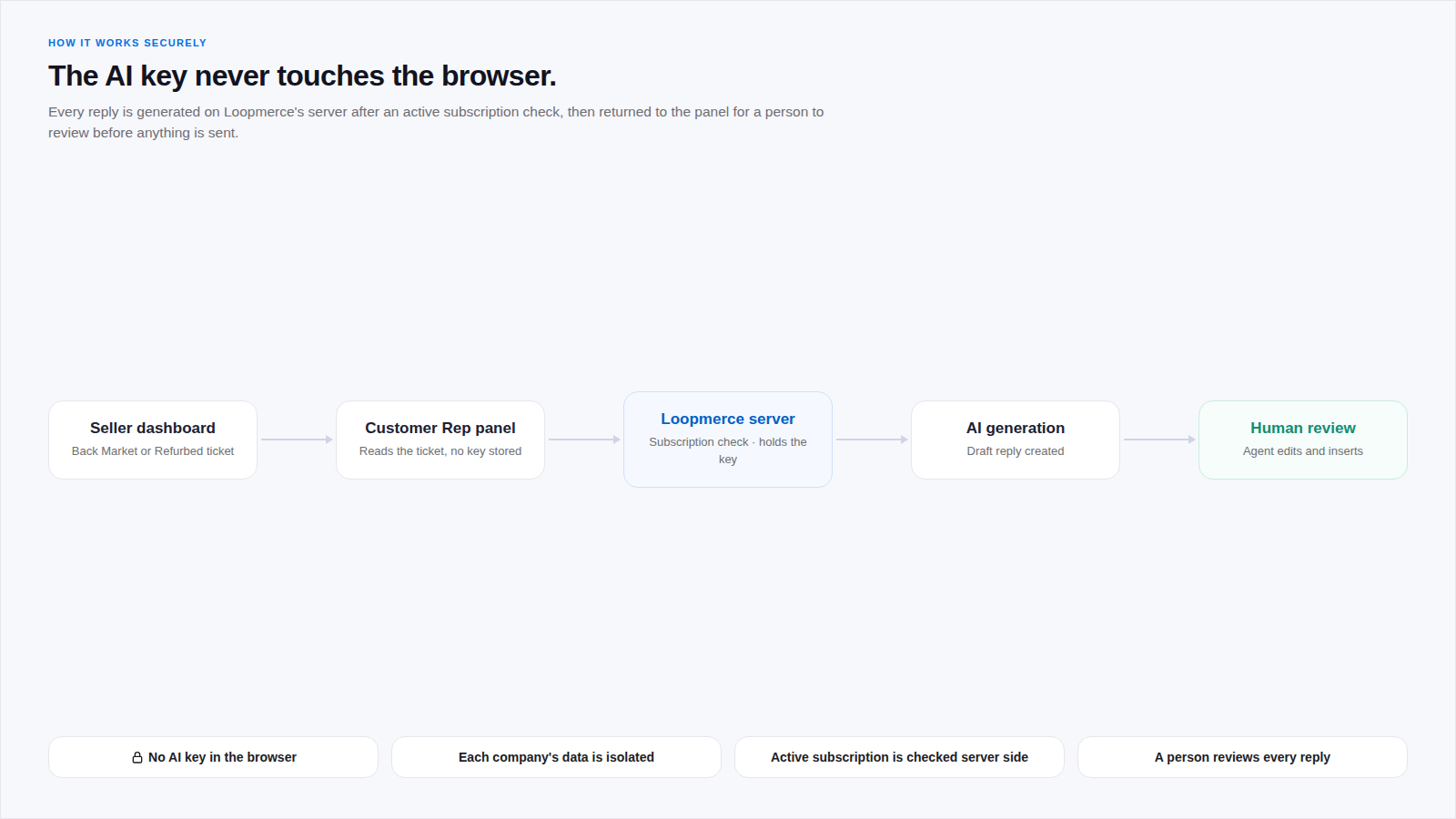
  • No AI keys stored in the browser
  • Active access checked on the server
  • Company accounts isolated
  • Agent settings remain on the device where applicable
  • No advertising tracking
  • Data is not sold
  • Extension activates only on supported dashboards
  • Human review remains available
A flow showing the seller dashboard, the Customer Rep panel, the Loopmerce server holding the key, AI generation and a final human review
One price. The complete agent workflow.

Give your support team Customer Rep for €149 per month.

Equip up to two agents with the Chrome side panel, AI-assisted replies, recommended actions and operational tools they need beside supported marketplace tickets.

Loopmerce Customer Rep
Chrome side panel for support agents
149/ month

Per organisation. Includes up to 2 PCs or agents. Billed monthly.

  • Chrome side-panel extension
  • Up to 2 PCs or agents
  • Unlimited AI-assisted replies under fair-use terms
  • 80+ Quick Reply templates
  • Supported Back Market and Refurbed workflows
  • Supported European languages
  • iCloud and Find My lock checks
  • Optional Google Sheets logging
  • Repeat-return detection
  • Company sign-off and agent settings
  • Personal activity view
  • Email and WhatsApp support
  • Monthly billing
  • Cancel any time
Download Chrome Extension

Activation requires an approved Loopmerce account.

Need more than 2 PCs? Contact us.

FAQ

Questions, answered.

Everything you need to know before getting started with Loopmerce Customer Rep.

Customer Rep is a Chrome side panel that reads the open Back Market or Refurbed ticket and available order context, then prepares the customer problem, a suggested reply and a recommended next action for the agent to review.
It works beside supported Back Market and Refurbed seller dashboards, including European marketplace workflows and the newer Refurbed support environment. It activates only on supported dashboards.
No. It is a docked side panel that opens beside the ticket you already work in, so the agent stays in the marketplace instead of switching to another portal.
No. Customer Rep prepares a draft for the agent to review, edit or regenerate. A person copies or inserts the final response, so human review stays in control.
Yes. The agent can edit the reply directly, or use Brief the AI to add a short instruction and regenerate a new draft.
Customer Rep can prepare replies across supported European languages, including German, French, Dutch, Italian, Spanish, Portuguese and Polish, based on the available order and conversation context.
For supported Apple-device cases, the agent can run an optional iCloud or Find My lock-status check from the panel. The result stays beside the ticket and helps clarify repair, return and refund handling.
When logging is connected, the handled case is recorded in the organisation's own spreadsheet. Fields such as order ID, IMEI or serial, issue, date and iCloud status are filled automatically, while repair, refund, return, replacement and tracking are agent-managed.
Yes. Logging is optional and only records to a spreadsheet the organisation connects.
The subscription is per organisation and includes up to 2 PCs or agents. Need more than 2 PCs? Contact us.
The extension sends the available open-ticket content securely to Loopmerce and its AI provider only when a response is requested. No AI keys are stored in the browser, company accounts are isolated, there is no advertising tracking and data is not sold.
No. Loopmerce is an independent product and is not owned or endorsed by Back Market or Refurbed.

Still have a question? Contact Loopmerce.

See it inside your own workflow

Open a ticket. Get the problem, reply and next action.

Bring the ticket context, prepared response and recommended next step into one Chrome side panel beside your supported Back Market and Refurbed conversations.

€149/month. Up to 2 PCs included. Account approval required.